
Palworld is one of the strangest and most controversial games of recent years, with its stunningly abrupt shifts from serene building and taming of cute animals to brutal battles and inhumane working conditions. So, Palworld may raise a lot of questions, but first, let’s answer the most basic one and figure out where to find save files if you ever need them.
For the official Steam version of the game, the path to Palworld saves is as follows:
- C:/Users/[Username]/AppData/Local/Pal/Saved/SaveGames/
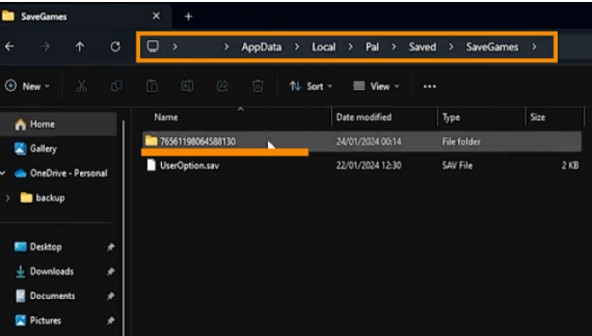
our saves will be located in a folder associated with your Steam ID, which you likely only have one of, so you don’t need to know that information, but if you do decide to, we have a separate guide on the topic.
If you managed to purchase the PC version of Palworld from the Microsoft Store or gained access to it through a Game Pass subscription , your saves folder will be different:
- C:/Users/[Username]/AppData/Local/Packages/PocketpairInc.Palworld_ad4psfrxyesvt/SystemAppData/wgs/[Random Character Set Folder]/
With pirated Palworld builds, the path to saves can be the same as with licensed ones, or completely different. Here are a few examples from popular distributions:
- C:/Users/[Username]/AppData/Local/Pal/Saved/SaveGames/76561197960271872/
- C:/Users/Public/Documents/Steam/RUNE/1623730/remote/
- C:/Users/Public/Documents/OnlineFix/1623730/Saves/
However, in most cases, some users may have trouble locating the AppData folder, which is hidden by default by Windows security settings. To reveal it, simply check the “Hidden items” box or use the keyboard shortcut Win + R and enter %APPDATA% in the window that opens.
As for Linux users and Steam Deck portable consoles , they are more fortunate, as Palworld saves will always be located in one place:
- ~/.steam/steam/userdata/[ Your Steam ID ]/1623730/







