
Hytale’s sandbox features a built-in cheat feature that can be used to fine-tune the world, moderate multiplayer, and add items to your inventory. It works in both game modes: creative, where players have complete freedom of movement, and exploration, where progression and survival are paramount. Console commands are easy to use, but given the game’s Early Access status, some of them may not work correctly, and the effects of combinations aren’t always predictable from the descriptions.
In this guide, we’ll explain how to enable cheat codes in the world and on the server, provide a complete list with explanations of the actions and entry rules, and explain which items can be added by ID and how to do so.
Bookmark this page to keep the codes handy. For quick navigation within the guide, use the content navigation on the left. We’re gradually adding new commands and item IDs, as well as expanding the descriptions of existing ones.
How to enable cheats
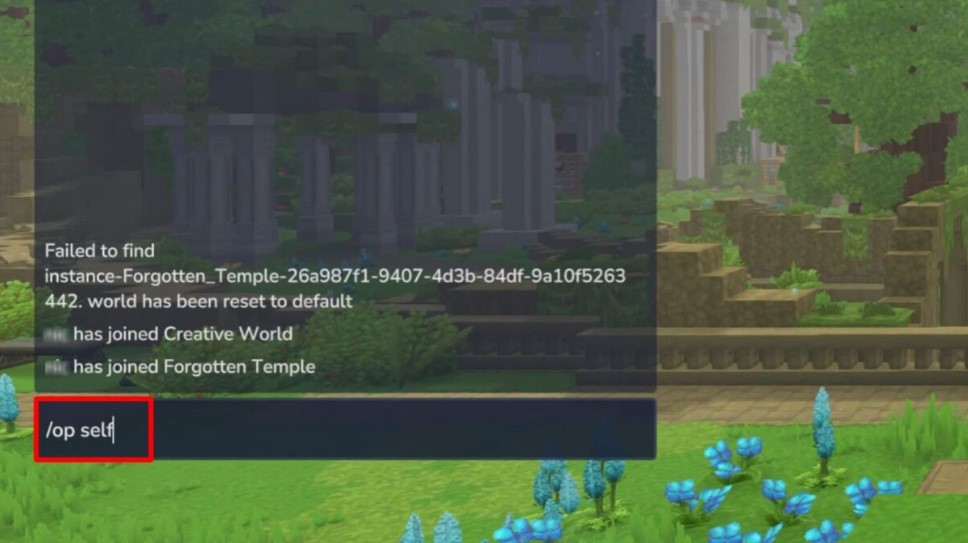
To use console commands, you must grant yourself or your friends admin status. Press “Enter” to open chat and type “/op self .” To grant operator status to other players, use “/op add nickname , “ and to undo it, use “/op remove nickname . “
All console commands in Hytale
A full list of cheat codes can be found using the “/help” command , but the help information is not structured and is not translated into Russian.
Basic cheats
This category includes all commands useful to the average user: saving from death, returning home, issuing basic tools and materials.
In commands with additional parameters (quantity, options), replace the “—” sign with two minuses (“-“).
| Code | Team Assignment |
| /heal | Restores maximum health and stamina. |
| /fillsignature | Replenishes the energy indicator. |
| /gamemode creative | Changes the mode to creative. |
| /memories unlockall | Unlocks all memories. |
| /tp home | Teleports home. |
| /warp set [name] | Sets the teleportation point to the current position. |
| /warp go [name] | Teleports to the specified waypoint. |
| /warp list | Shows a list of all warps. |
| /noon | Changes the time to noon and stops it there. |
| /give Tool_Pickaxe_Cobalt | Gives a cobalt pickaxe. |
| /give Tool_Hatchet_Cobalt | Adds a cobalt axe to your inventory. |
| /give Bench_Alchemy | Gives out an alchemical workbench. |
| /give Bench_Arcane | Adds an arcanist workstation. |
| /give Bench_Memories | Gives out a workbench of memories. |
| /give Ingredient_Bar_Copper —quantity=100 | Adds 100 Copper Ingots to your bag. |
| /give Ingredient_Bar_Iron —quantity=100 | Adds 100 iron ingots. |
| /give Ingredient_Bar_Cobalt —quantity=100 | Adds 100 Cobalt Ingots. |
| /give Plant_Fruit_Berries_red —quantity=100 | Produces 100 red berries. |
| /cursethis | Places a curse on the item in your hands. |
Character customization and management
This category includes codes that interact with the characteristics and inventory of your character and other players.
In commands with additional parameters (size, amount), you must manually enter two “-” signs before them.
| Code | Team Assignment |
| /heal | Restores maximum health and stamina. |
| /fillsignature | Replenishes the energy indicator. |
| /leave | Leave a fragment of the world. |
| /unstuck | Teleports to the top of the world at the current position. |
| /inventory backpack —size=X | Expands the backpack to the specified value. Replace “X” with a number. |
| /inventory clear | Clears inventory of all items. |
| /inventory see nickname | View the contents of another player’s inventory. Replace “nickname” with a specific name. |
| /memories unlockall | Unlock all memories. |
| /memories clear | Clear all memories. |
| /kill nickname | Kill the specified player. Replace “nickname” with a specific name. |
| /neardeath | Set HP to one. |
| /damage nick —amount=X | Deals the entered amount of damage to the specified player. |
| /player respawn | Respawns the game character. |
| /whoami nickname | Displays information about the specified player. |
| /emote (emotion) |
Loses emotion. |
Cheats for creativity
Managing blocks and using developer tools is suitable for authors involved in the construction of volumetric maps.
In commands with additional parameters (quantity, options), write two “-” signs instead of “—”.
| Code | Team Assignment |
| /gamemode creative | Sets the game mode to Creative. |
| /block set [x] [y] [z] [block name] | Places the specified block at the entered coordinates. |
| /block get [x] [y] [z] | Takes a block from the specified coordinates. |
| /block setstate [x] [y] [z] [state] | Sets the block at the entered coordinates to the specified state. |
| /copy | Copies the selected area. |
| /cut | Cuts out the selected area |
| /paste | Pastes the selected area. |
| /undo [quantity] | Undoes previous changes. |
| /buildertoolslegend [-option] | Shows or hides the construction team legend in the HUD. |
| /chunk | Chunk related commands. |
| /prefab | Prefab commands. |
| /prefabspawner | Viewing and editing properties in the start block. |
| /weather | Changes the weather. |
| /world | World-related commands. |
| /worldgen | World generator configuration commands. |
| /worldmap | Manage game map settings. |
| /worldpath | Commands for managing the world’s paths. |
| /hub | Return to the creative hub. |
| /importimage | Converts image into blocks. |
| /environment | Changing environment settings. |
| /pos1 | Sets the first selection point. |
| /pos2 | Sets the second selection point. |
| /redo [quantity] | Reverts undone changes. |
| /rotate [angle] | Rotates the clipboard. |
| /flip [direction] | Reverses the clipboard. |
| /fillblocks [block] | Fills the selected area with blocks. |
| /replace [block 1] [block 2] | Replaces a block of the first type with blocks of the second. |
| /expand | Expands the selection area. |
| /selectchunk | Selects the entire chunk. |
| /prefab save | Saves the structure as a prefab. |
| /prefab load | Loads a saved prefab. |
| /time [value] | Sets the time value. |
| /clear blocks | Removes all blocks in the selected area. |
| /deselect | Deselects. |
| /hollow | Selects a selection. |
| /itemstate [state] | Modifies the state of a held item. |
| /shift | Moves the selected chunks. |
| /wall [blocks] | Creates walls in the selected area. |
| /contractselection [distance] | Reduces the selection by the specified number of blocks across all coordinates. |
| /convertprefabs [—options] | Converts prefabs to the latest format. |
| /delete | Fills the selected area with empty space. |
| /mount | Mounts the block. |
| /dismount | Unmounts the block. |
| /droplist [—options] |
Simulates a crash for the specified list. |
| /echo [message] | Sends a message. |
| /editline (start) (end) (material) [—options] |
Draws a line from start to finish from the specified blocks. |
| /importbj | Converts /instances obj file into blocks. |
| /move |
Moves the selected area in the direction of view. |
| /prefab delete |
Deleting a prefab. |
| /prefab list |
List of prefabs. |
| /recipe |
Commands for managing crafting recipes. |
| /repairfillers |
Repairs blocks in the selected area. |
| /setblocks [pattern] | Replaces all blocks in the area with the specified type. |
| /tint (color) |
Color the selected area with the specified color. |
Teleportation and world map
Fast travel across the game map and explore all biomes for a light adventure mode.
| Code | Team Assignment |
| /warp set [name] | Sets the current position as a warp. |
| /warp go [name] | Teleports to the specified waypoint. |
| /warp remove [name] | Removes the selected warp. |
| /warp list | Shows a list of all teleportation points. |
| /warp reload | Reboots warps. |
| /spawn | Move to the spawn point. |
| /tp home | Teleports home. |
| /tp nickname | Moves to the specified player. Enter the exact nickname. |
| /tp top | Sends to the highest point in the world nearby. |
| /gamemode creative | Change mode to creative. |
| /gamemode exploration | Change mode to research. |
| /worldmap reload | Reloads the world map. |
| /worldmap discover | Explores all zones on the world map. |
| /worldmap undiscover | Closes all zones on the world map. |
| /world clearmarkers | Clears all markers on the map. |
Change of time and weather
Time of day and weather often complicate gameplay, but these parameters can be controlled manually:
| Code | Team Assignment |
| /time X | Changes the time to the specified hour. Replace “X” with a number from 0 to 24. |
| /time dawn | Set the time to dawn. |
| /time midday | Time change to noon. |
| /time dusk | Set the time to sunset. |
| /time midnight | Time change to midnight. |
| /noon | Sets the time to noon and stops it. |
| /weather reset | Sets the default weather. |
| /weather | Managing the world’s weather. |
Server commands for admins
The following cheats are mainly related to the administrator role and are used to manage general settings of the game server.
| Code | Team Assignment |
| /backup | Creates a backup copy of the world. |
| /stop | Stops the server. |
| /server dump | Exports server details in txt format. |
| /server gc | Forces the server to clear its memory by unloading unused data. |
| /server stats [CPU/memory/GPU] | Providing server statistics. |
| /op self | Grants or removes administrator rights. |
| /op nickname | Give the operator to another player. |
| /who | List of all players online. |
| /whereami nickname | Shows the coordinates of the specified player. |
| /whoami nickname | Shows information about the specified person. |
| /op remove nickname | Removes admin rights from a player. |
| /auth [command] | Configures authentication on the server:
|
| /spawning | Commands related to NPC spawning. |
| /ambience | Atmosphere control commands. |
| /assets | Asset related cheats. |
| /bindings | Bind commands. |
| /camshake | Commands for controlling camera effects. |
| /checkpoint | Parkour system control. |
| /clearedithistory | Clear clipboard history. |
| /clearentities | Cleanses entities. |
| /commands |
Output information about commands. |
| /debug | Debugging commands. |
| /debugplayerposition | Helps with debugging the player’s position if desynchronization occurs. |
| /desyncdamage |
Enables damage desynchronization mode. |
| /editprefab | Allows you to save, delete and customize prefabs. |
| /entity | Entity related commands. |
| /eventtitle [—options] | Displays the event name to all players on the server. |
| /extendface |
Expands the selected edge. |
| /fluid |
Debugging liquids. |
| /fragment |
Commands for use within a portal fragment. |
| /gmask | Sets the global block mask. |
| /hitbox |
Returns information about the hitbox. |
| /hitboxcollision |
Allows you to enable or disable hitbox collision for an entity. |
| /hitdetection | Enables visual debugging. |
| /hudtest [—options] | Hides the quick access bar for checking the HUD. |
| /instances | Commands for working with world instances. |
| /interaction |
Interaction with interactive objects. |
| /inventory |
Inventory commands. |
| /landdiscovery [—options] |
Enables or disables local exploration. |
| /lang |
Commands related to languages and localization. |
| /lightning |
Controlling the world’s lighting. |
| /log (loggers) [—options] |
Various server logging parameters. |
| /messagetest |
Test sending of a message with translation. |
| /model |
Opens the model selection page. |
| /network |
Commands for managing network settings. |
| /networkchunksending |
Stops sending chunks over the network. |
| /npc | NPC related commands. |
| /objective |
Commands related to objects. |
| /packetstats (packets) [–options] |
Display packet statistics for a specific packet. |
| /packs |
Commands related to asset sets. |
| /particle |
Cheats responsible for particles. |
| /path |
Managing NPC routes. |
| /perm |
View rights and permissions. |
| /pidcheck [–options] |
Checks if the PID is running. |
| /ping [—options] |
Ping information. |
| /ping clear [–options] |
Clears ping data history. |
| /ping graph [–options] | Displays ping data as a graph. |
| /play | Allows you to enable mods on the server. |
| /plugin | Managing plugins. |
| /repulsion | Adds or removes knockback from an item. |
| /reputation |
Reputation management. |
| /resetrotation |
Sets the camera rotation to the standard position. |
| /scriptedbrushes | Commands for scripted brushes. |
| /selectchunksection |
Selects the selected chunk. |
| /setticking (ticking) [—options] | Determines whether time passes in the world. |
| /settimeandgohome (time of day) |
Sets the time of day and teleports the player home. |
| /settoolhistorysize (history length) |
Sets the number of tool actions saved in history. |
| /sleep |
Managing sleep related things. |
| /sound |
Plays sound effects. |
| /spawn set |
Sets the spawn point for everyone or for a specific player. |
| /spawnblock (block) (position) [—options] |
Creates an entity block. |
| /spawnitem (item) [–options] | Spawns an item. |
| /stack [—options] |
Selecting a stack. |
| /stash [—options] | Lists items for the currently used chest. |
| /stresstest |
Server stress test. |
| /submerge (liquid item) |
Immerses the selected area in liquid. |
| /sudo [nickname] | Executes a command on behalf of another player. |
| /tagpattern (pattern tag) (block type) |
Checks if the selected block matches the specified pattern. |
| /update | Commands for updating prefabs and assets via Git. |
| /toggleblock placementoverride |
Allows you to break block placement rules. |
| /toggletmptags |
Display tags in timelines. |
| /updateselection (xMin) (yMin) (zMIn) (xMax) (yMax) (zMax) | Updates the selected area at the specified coordinates. |
| /validatecpb [–options] |
Checking compressed prefab buffer files. |
| /version |
Displays the version of the current server. |
| /viewport [—options] |
Creates a world generation window for the selected region. |
| /voidevent |
Commands related to abyssal events. |
| /wait (time) [–options] |
Waits for the specified time before terminating asynchronously. |
| /webserver |
Managing web server settings. |
Commands for multiplayer moderators
If you are an administrator of a large server and monitor the behavior of other users, then keep commands for managing players handy.
Inside the commands, replace the “—” sign with two minuses (“-“).
| Code | Team Assignment |
| /ban nickname [—reason] | Bans the specified player and states the reason. |
| /kick nickname | Kicks the specified player from the server. |
| /unban nickname | Unbans a player. |
| /whitelist list | Shows all players in the whitelist. |
| /whitelist enable/disable | Enables or disables the whitelist. |
| /whitelist add nickname | Adds a player to the whitelist. |
| /whitelist remove nickname | Removes from whitelist. |
| /maxplayers [—number] | Sets the maximum number of players on the server. |
| /kill nickname | Kills the specified player. |
| /hide | Hides players from others present on the server. |
| /refer [host] [port] [–options] | Redirects the player to another server for testing. |
| /notify | Sends a notification to all players in the world. |
| /say | Sends a message to the entire server. |
Adding items
Like other sandbox games, Hytale has console commands for issuing items by ID.
| Code | Team Assignment |
| /give ID |
Gives one selected item. Example: /give Tool_Repair_Kit_Iron |
| /give ID —quantity=X |
Adds several items to your inventory. Example: /give Rock_Gem_Ruby ––quantity=50 |
| /give nickname ID —quantity=Х | Gives the specified player the required amount of the selected item. |
IDs of all items in Hytale
To issue items, substitute the desired ID into the commands above. The items below list all known item IDs. For example, to receive one hundred copper ingots, you would enter this text:
/give Ingredient_Bar_Copper —quantity=100
Within commands, replace the “—” sign with two minuses (“-“).
Ores and precious stones
Ores are the main raw material for creating tools and durable structures:
| Item | ID |
| Copper ore | Ore_Copper |
| Iron ore | Ore_Iron |
| Silver ore | Ore_Silver |
| Cobalt ore | Ore_Cobalt |
| Thorium ore | Ore_Thorium |
| gold ore | Ore_Gold |
| Mithril ore | Ore_Mithril |
| Adamantium Ore | Ore_Adamantite |
| Onyxium ore | Ore_Onyxium |
| Prismatic ore | Ore_Prisma |
| Copper ingot | Ingredient_Bar_Copper |
| Iron ingot | Ingredient_Bar_Iron |
| Bronze ingot | Ingredient_Bar_Bronze |
| Silver bar | Ingredient_Bar_Silver |
| Cobalt ingot | Ingredient_Bar_Cobalt |
| Gold bar | Ingredient_Bar_Gold |
| Mithril Ingot | Ingredient_Bar_Mithril |
| Adamantium ingot | Ingredient_Bar_Adamantite |
| Onyxium ingot | Ingredient_Bar_Onyxium |
| Prismatic ingot | Ingredient_Bar_Prisma |
| Emerald | Rock_Gem_Emerald |
| Ruby | Rock_Gem_Ruby |
| Sapphire | Rock_Gem_Sapphire |
| Marshmallow | Rock_Gem_Zephyr |
| Topaz | Rock_Gem_Topaz |
| Stone of the Abyss | Rock_Gem_Voidstone |
Wood
Wood acts as a basic building unit, also required for many crafts:
| Item | ID |
| Azure | Wood_Azure_Trunk |
| Birch | Wood_Birch_Trunk |
| Beech | Wood_Beech_Trunk |
| Mahogany | Wood_Redwood_Trunk |
| Cedar | Wood_Cedar_Trunk |
| Oak | Wood_Oak_Trunk |
Seeds and fruits
With the help of seeds you can create your own garden, or immediately give yourself food:
| Item | ID |
| Carrot seeds | Plants_Seeds_Carrot |
| Corn seeds | Plants_Seeds_Corn |
| Cotton seeds | Plants_Seeds_Cotton |
| Lettuce seeds | Plants_Seeds_Lettuce |
| Maple seeds | Plants_Seeds_Maple |
| Pumpkin seeds | Plants_Seeds_Pumpkin |
| Tomato seeds | Plants_Seeds_Tomato |
| Turnip seeds | Plants_Seeds_Turnip |
| Wheat seeds | Plants_Seeds_Wheat |
| Apple | Plant_Fruit_Apple |
| Azure | Plant_Fruit_Azure |
| Red berry | Plant_Fruit_Berries_Red |
| Pink berry | Plant_Fruit_Pinkberry |
Basic raw materials
Raw materials are used in crafting at the early stage of the game:
| Item | ID |
| Stick | Ingredient_Stick |
| Mana Harvest | Plant_Crop_Mana3 |
| Textile | Ingredient_Fiber |
Tools
All existing types of tools made from different raw materials:
| Item | ID |
| Copper pickaxe | Tool_Pickaxe_Copper |
| Iron pickaxe | Tool_Pickaxe_Iron |
| Cobalt Pickaxe | Tool_Pickaxe_Cobalt |
| Thorium pickaxe | Tool_Pickaxe_Thorium |
| Mithril Pickaxe | Tool_Pickaxe_Mithril |
| Adamantite Pickaxe | Tool_Pickaxe_Adamantite |
| Onyxium Pickaxe | Tool_Pickaxe_Onyxium |
| Copper axe | Tool_Hatchet_Copper |
| Iron Axe | Tool_Hatchet_Iron |
| Cobalt Axe | Tool_Hatchet_Cobalt |
| Thorium axe | Tool_Hatchet_Thorium |
| Mithril Axe | Tool_Hatchet_Mithril |
| Adamantite Axe | Tool_Hatchet_Adamantite |
| Onyxium Axe | Tool_Hatchet_Onyxium |
| Iron repair kit | Tool_Repair_Kit_Iron |
| Watering can | Tool_Watering_Can |
| Scissors | Tool_Shears_Basic |
| Iron shovel | Tool_Shovel_Iron |
Craft stations and transport
Objects that allow you to create items, consumables, weapons, and other hand-used items:
| Item | ID |
| Alchemical table | Bench_Alchemy |
| Magic table | Bench_Arcane |
| Armor table | Bench_Armour |
| Construction workbench | Bench_Builders |
| Kitchen table | Bench_Cooking |
| Farmer’s Table | Bench_Farming |
| Smelting furnace | Bench_Furnace |
| Furniture workbench | Bench_Furniture |
| Disassembly table | Bench_Salvage |
| Tannery table | Bench_Tannery |
| Weapons table | Bench_Weapon |
| Workbench | Bench_WorkBench |
| Feeder | Bench_Trough |
| Table of Memories | Bench_Memories |
| Wooden boat | Vehicle_Wood_Boat |
| Rail trolley | Rail_Kart |
Console commands will help add variety and simplification to your Hytale gaming sessions, as well as maintain a friendly environment on multiplayer servers.






