Launching your own Hytale server may seem daunting at first, but it’s actually a very simple process that provides greater stability than joining someone else’s single-player world. The downside is that server maintenance often requires financial investment, but if you plan to play Hytale in multiplayer and with mods, this cost is usually justified by the opportunity to create your own unique gaming experience.
To help you get started, this Hytale server guide will detail everything you need to know about the game’s servers, including where to find new Hytale servers to join , how to set up your own Hytale server , and how to install mods on your Hytale server .
How to find a Hytale server to connect to
If you’d like to see what servers Hytale players and modders have already created, a good starting point is the Hytale Online Servers website . This website is a directory of public Hytale servers that you can browse and test.
Currently, the three most popular public servers for Hytale (each with its own unique goals and themes) are:
- Hyrivals is a PvP-focused server.
- Hytown is a server with RPG and MMO mods, focusing on dungeons, in-game economy, and minigames.
- Hytopia is a PvE-focused server that emphasizes teamwork, exploration, and shared progression.
As always, please exercise caution when connecting to new servers with strangers.
Also, check if the server you’re connecting to uses mods so you know what to expect. Hytale mods are entirely server-side, meaning you don’t need to install anything to connect to modded servers. However, depending on the mods installed on the server, the load on your computer may be higher, so keep that in mind.
How to launch a Hytale server
To launch a Hytale server, you first need to choose a reliable hosting provider. I’ve used Bisect Hosting to host my Hytale server, so in this guide, we’ll cover the server setup process using that service.
First, you need to choose the right pricing plan . If you plan to run a server with mostly vanilla gameplay, then 4GB of RAM should be sufficient. However, if you want to run a server with multiple mods and a large number of players, you’ll need a plan with 6GB of RAM or higher.
After selecting a plan, you’ll need to enter your details and pay for it. This will cost you a monthly fee, the amount of which depends on the plan you choose, as is typical for most hosting providers. You can cancel your subscription at any time if you decide to discontinue server support.
After purchasing a plan, look for an email in your inbox with the subject “Your BisectHosting Hytale Server Information .” This is a very important email, so be sure to bookmark it or mark it. It will contain your account password, which I recommend changing immediately, as well as a “Go to Control Panel” link under your server’s IP address.
After changing your password, click “Go to Control Panel” in this email , and on the page that opens, select your server . Your server’s control panel will then open.
This is your operational base, so to speak. From here, as well as using console commands, you can stop, start, and restart the server. You can also rename your server, change any settings, and install mods.
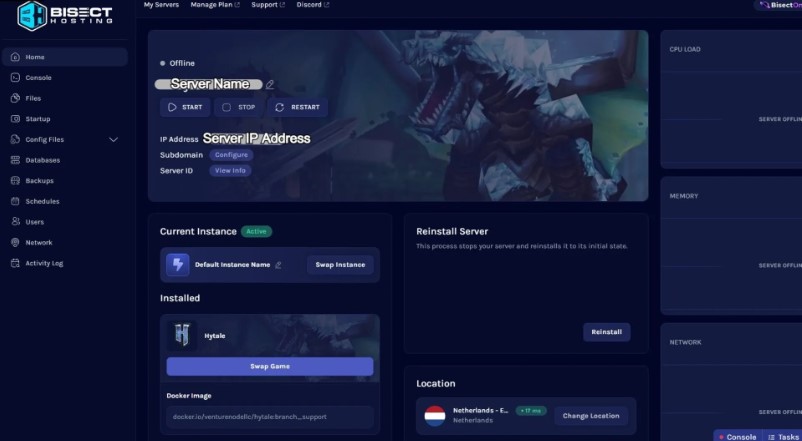
If your server is online, you’re ready to get started. To launch the server and start playing, follow these steps:
- Copy your server’s “IP address” from the Bisect control panel.
- Open Hytale and select “Servers”.
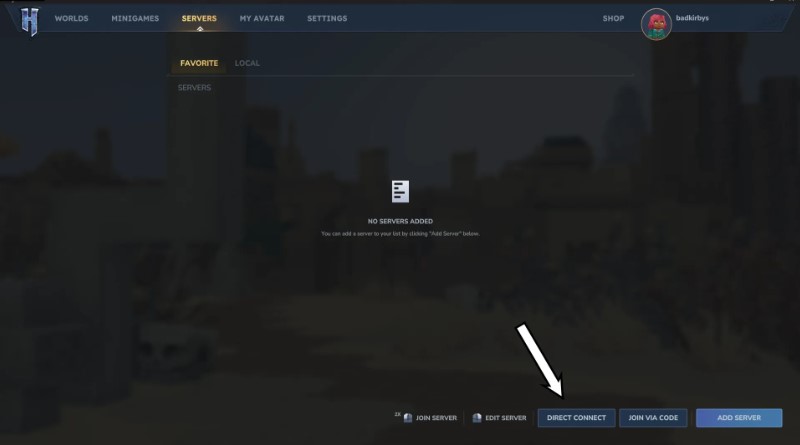
- Select “Direct Connection” and enter the IP address. You will be connected to the server.
- [Optional] To save a server to your list, click “Add Server” in the Hytale server menu and paste the IP address there.
Launching a Hytale server is incredibly easy, and it’s currently much more reliable than multiplayer worlds. In my experience, there were occasional minor lags, but overall, it didn’t hinder our enjoyment of building, resource mining, and farming.
How to install mods on a Hytale server
If you want to add mods to your Hytale server, first ask yourself two questions: how many mods do you want to install and does your server have enough RAM to handle them.
If you’re playing with a small group and want to download a few mods to improve the gameplay experience, a server with 4 or 6 GB of RAM will be sufficient. However, if you’re playing with a larger group and plan to install 10+ mods, I recommend ensuring your server has 12 GB of RAM or more.
After that, you need to find the specific mods you want to install. You can install them directly into the Hytale mods folder using
Next, you need to find the specific mods you want to install. You can install them directly into the Hytale mods folder using CurseForge Mod Manager , or manually by downloading the mod files to your downloads folder. If you choose the manual method, it’s highly recommended to put all the files in a single “mods” folder to avoid confusion.
Once you have chosen the mods and downloaded them, open the Bisect Hosting control panel for your server and make sure the server is turned off .
Next, find the drop-down menu on the left side of the control panel and select “Files .” At the top of the list, you’ll see a folder called “mods.” Drag all your mod files —whether from the game or your downloads folder—directly into this folder. This will successfully install the mods on your server.
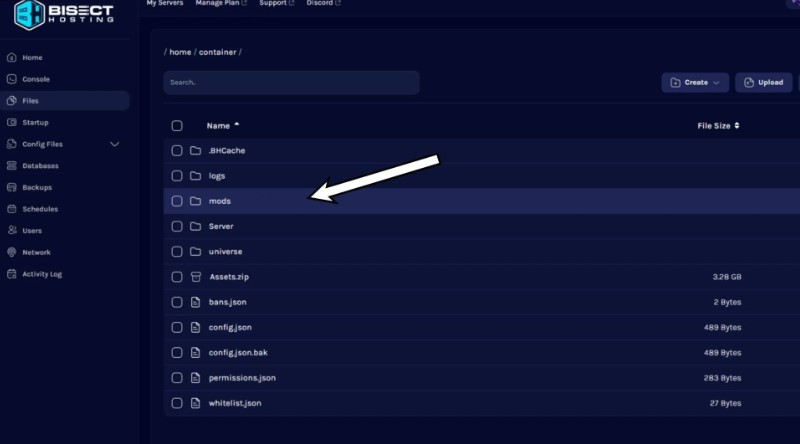
You can now turn on the server again and launch Hytale . Once you log into your server, all installed mods should be active and working for every player!
That’s all for setting up a server and installing mods in Hytale!






