
Far Cry 5 tops lists of the most underrated installments of this iconic series. And if you want to return to Hope County to see what you missed, it makes sense to dig up your old saves.
Ubisoft is persistently trying to lure players into its own digital store , forcing them to create separate accounts and install an additional launcher to launch the game. This forces saves to be stored in a separate location. The only caveat is that the Far Cry 5 save folder number will differ depending on the purchase method:
Uplay and Epic Games Store:
- C:/Program Files (x86)/Ubisoft/Ubisoft Game Launcher/savegames/[Your Uplay ID]/1803
Steam:
- C:/Program Files (x86)/Ubisoft/Ubisoft Game Launcher/savegames/[Your Uplay ID]/4311
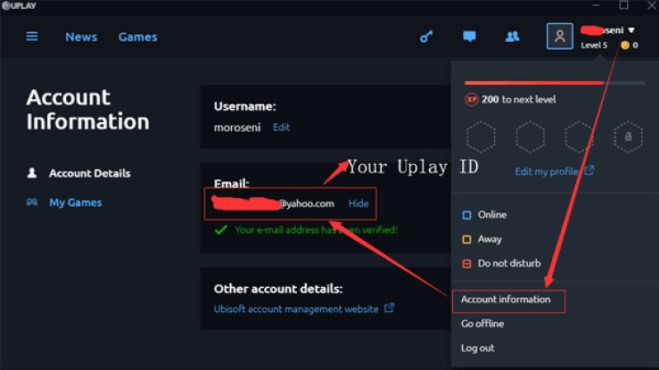
You can find your Uplay ID in your Uplay account settings.
For owners of pirated versions of Far Cry 5, this saves folder may be located in a different location or even have a different name. Here are a couple of examples:
- C:/Users/[Username]/Documents/CPY_SAVES/Player/UPLAY/1803
- C:/Users/Public/Documents/uPlay/CODEX/Saves/FarCry5
But for anyone who wants to play Far Cry 5 on a Steam Deck or another device running the Linux operating system , saves will always be stored in the same path:
- ~/.steam/steam/userdata/[Your Steam ID]/552520/
In this case, you may need your Steam ID. If you’re unsure what this means, we recommend checking out our guide on the topic.







